
How to Choose the Right Microsoft 365 Plan for Your Business
Navigating the myriad of microsoft 365 plans for business can be a daunting task for any organization. With a vast array of features, pricing tiers, and continuous updates (such as the significant packaging and pricing changes coming in July 2026), making the wrong choice can lead to wasted budget or critical security vulnerabilities. At iTechwx, acting as a practical and trusted microsoft cloud solutions provider, we understand that licensing is not just about buying software. It is about equipping your team with the precise tools they need to succeed. This article provides a detailed microsoft 365 plan comparison to help you evaluate your needs based on team types, security requirements, device management, and support expectations.
Assessing Plan Needs by Team Type
Frontline Workers vs. Information Workers
Every employee in your organization has distinct workflows and technological needs. For frontline workers (such as retail staff, healthcare workers, or manufacturing floor employees), providing heavy desktop applications is unnecessary and not cost-effective. Plans like Microsoft 365 F1 or F3 are optimized for this demographic, providing essential communication tools via Microsoft Teams, identity management, and access to web and mobile apps.
Conversely, information workers and management require comprehensive processing power. They need fully installed desktop Office applications (Word, Excel, PowerPoint), substantial cloud storage (1TB to 5TB with OneDrive), and advanced collaboration tools. For this group, Business Standard or Enterprise E3 plans are essential to ensure uninterrupted productivity and seamless document management.
Evaluating Security Requirements
Basic Protection vs. Advanced Threat Defense
Security is non-negotiable in today’s digital landscape. Basic plans like Business Basic and Standard offer Exchange Online Protection, which guards against standard spam and known malware. However, if your business handles sensitive financial data, intellectual property, or customer information, this baseline protection is insufficient.
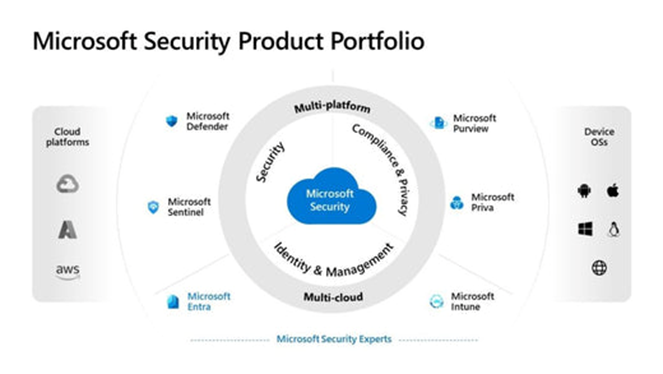
To defend against sophisticated phishing attacks, ransomware, and zero-day threats, proactive security features are required. The Microsoft 365 Business Premium plan includes Microsoft Defender for Business, offering AI-driven endpoint protection. For larger corporations, the Enterprise E5 plan delivers the most comprehensive security suite available, featuring Microsoft Defender for Office 365 Plan 2, advanced identity protection, and Purview Insider Risk Management tools.
Device Management Needs (MDM & MAM)
BYOD vs. Corporate-Owned Devices
With the permanent shift towards remote and hybrid work environments, controlling where and how corporate data is accessed is critical. If your employees use personal devices (Bring Your Own Device – BYOD), you must implement Mobile Application Management (MAM). MAM allows you to secure corporate data within apps like Outlook or Teams without intruding on the user’s personal data or privacy.
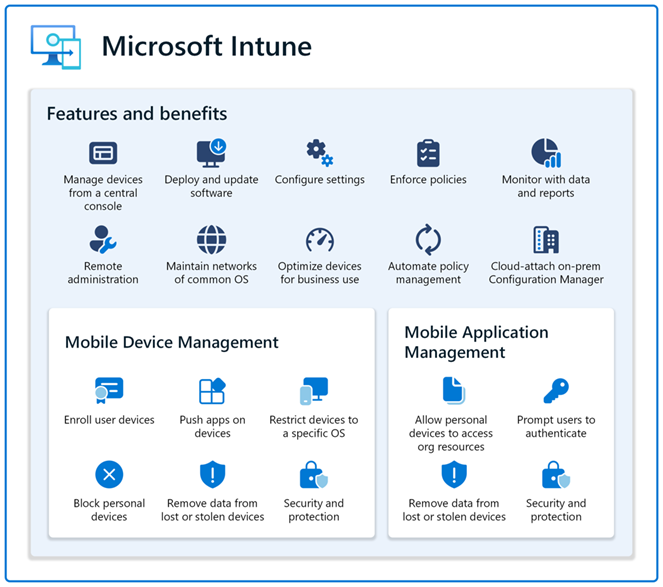
For corporate-owned devices, Mobile Device Management (MDM) via Microsoft Intune is the optimal solution. Intune (included in Business Premium and Enterprise plans) allows administrators to enforce PIN policies, mandate BitLocker drive encryption, deploy applications automatically, and remotely wipe data if a device is lost or stolen. Recent updates to Intune also introduce capabilities like Endpoint Privilege Management and Remote Help, significantly reducing the burden on your IT helpdesk.
Support and SLA Expectations
The level of support and reliability your business demands is a major deciding factor. Business plans come with basic phone and online support, alongside a standard 99.9% uptime Service Level Agreement (SLA). If the service falls below this threshold, you may be eligible for service credits.
However, for large-scale enterprises where every minute of downtime can result in massive financial losses, Enterprise plans (E3, E5) offer financially backed SLAs for specific services and access to dedicated 24/7 critical support teams. At iTechwx, as your strategic microsoft 365 licensing partner, we go beyond merely reselling licenses. We provide customized layers of technical support and strategic guidance to ensure your systems remain operational, secure, and fully compliant with industry standards.
A Quick Comparison of Core Plans
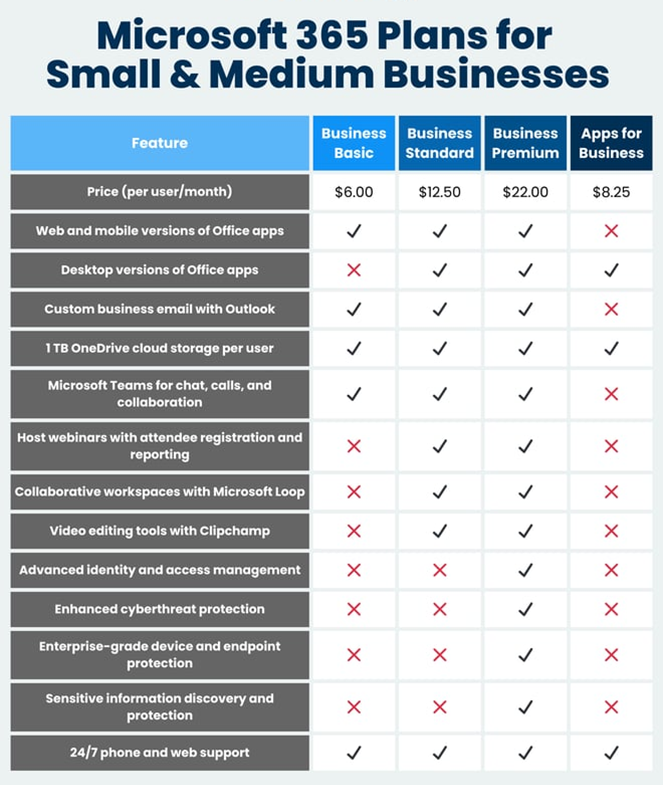
To conduct an effective microsoft 365 plan comparison, consider the following segments (keeping in mind the 300-user limit for Business plans):
- Microsoft 365 Business Basic: Ideal for small businesses that only require professional email, cloud storage, and basic web/mobile applications.
- Microsoft 365 Business Standard: Best suited for users who need full desktop applications (Word, Excel, PowerPoint) and enhanced collaboration tools like webinar hosting.
- Microsoft 365 Business Premium: The most comprehensive and high-value choice for businesses under 300 users. It seamlessly integrates productivity apps with advanced security (Defender) and device management (Intune).
- Microsoft 365 Enterprise (E3/E5): Specifically designed for organizations with over 300 users, or those with the most stringent regulatory compliance, data analytics (Power BI), and security requirements.
Selecting the right plan not only optimizes your IT spend but also establishes a robust foundation for future growth, especially as you look to integrate AI tools like Microsoft 365 Copilot. Let iTechwx, your trusted microsoft cloud solutions partner, help you navigate this complexity, accurately assess your needs, and build a secure, modern, and highly productive workplace.